Tailscale
Overview
The Tailscale add-on connects your Tapitalee application to your Tailscale mesh VPN network. This enables secure private networking between your app and other devices on your Tailscale network — no public IP or open inbound ports required.
Once connected, devices on your Tailscale network can reach your app’s internal services, and optionally your app can forward traffic to hosts on your Tailscale network via a proxy sidecar.
How It Works
Tailscale Network → Tailscale Connector (container) → AWS VPC (your app's resources)
- Connector Container: A Tailscale container runs in your AWS environment and joins your Tailscale network using an auth key
- Route Advertisement: The connector advertises the VPC’s subnets as routes on your Tailscale network
- Inbound Access: Devices on your Tailscale network that have accepted routes can reach any service in the app’s VPC (databases, caches, internal services, etc.)
- Optional Proxy Shortcut: If
proxy_tois configured, the Tailscale node forwards a specific port to a single VPC service — no need for clients to accept routes
Important: This add-on only enables inbound networking — from your Tailscale devices into the AWS VPC. It does not allow your app to make outbound connections to other devices on your Tailscale network.
Purpose and Benefits
- Private Networking: Access your app’s VPC resources (databases, caches, etc.) from any device on your Tailscale network without exposing them publicly
- Secure by Default: All traffic is encrypted end-to-end with WireGuard
- Proxy Shortcut: Use
proxy_toto access a single VPC service (e.g. an RDS database) without requiring clients to accept subnet routes - Lightweight: Runs on a small standalone container, not an EC2 instance
Prerequisites
- A Tailscale account
- A Tailscale auth key from your admin console:
- Add device, type: Linux
- Set any tags needed
- Do not enable “Ephemeral”
- Do not enable “Reusable”
- Copy the auth key (see screenshot below) and paste it into the creation form in Tapitalee
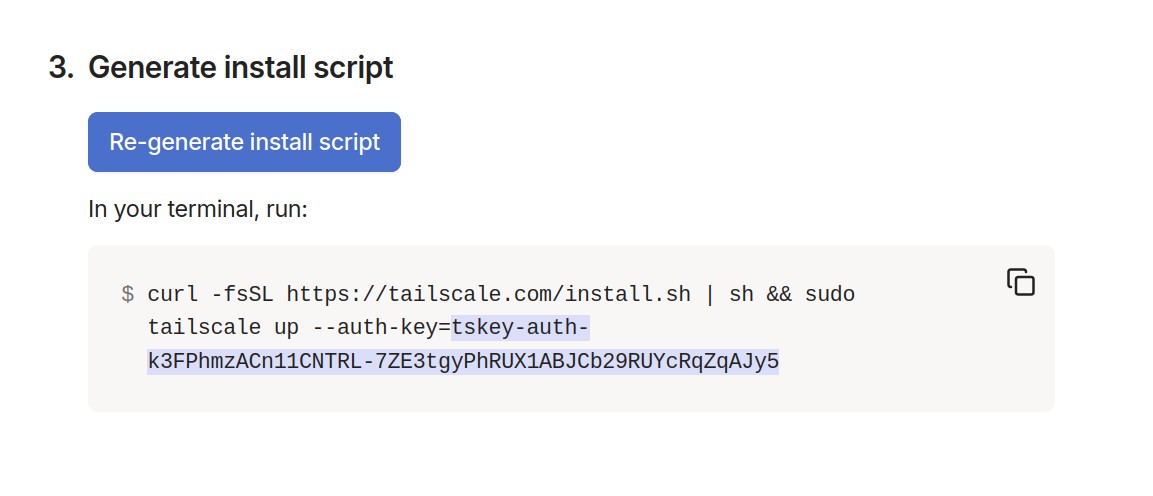
- After the add-on has finished creating in Tapitalee, find the new host that appeared in your Tailscale device list:
- Click on the pop-up menu dots for this host
- Edit subnet settings and enable the subnet being shared
- Disable key expiry (if enabled)
CLI Usage
Create Tailscale
tapit create tailscale ts_authkey=KEY [name=NAME] [proxy_to=HOST:PORT]
Required Parameters
| Parameter | Description |
|---|---|
ts_authkey |
Your Tailscale auth key (TS_AUTHKEY) from the Tailscale admin console |
Optional Parameters
| Parameter | Description |
|---|---|
name |
Hostname this node will appear as in your Tailscale network |
proxy_to |
Host:port of a VPC service (e.g. RDS endpoint) to expose on this Tailscale node’s IP without requiring clients to accept routes |
Examples
# Create with just an auth key
tapit create tailscale ts_authkey=tskey-auth-abc123...

# Create with a custom hostname
tapit create tailscale ts_authkey=tskey-auth-abc123... name=my-production-app

# Create with proxy forwarding to an RDS database in the VPC
tapit create tailscale ts_authkey=tskey-auth-abc123... name=my-app proxy_to=mydb.abc123.us-east-1.rds.amazonaws.com:3306
Update Tailscale
tapit set tailscale name=addon_name [description=DESCRIPTION] [proxy_to=HOST:PORT]
Required Parameters
| Parameter | Description |
|---|---|
name |
The name of the Tailscale add-on to update |
Optional Parameters
| Parameter | Description |
|---|---|
description |
Update the add-on description |
proxy_to |
Update the proxy target host:port (a VPC service endpoint) |
Examples
# Update description
tapit set tailscale name=my-tailscale description="Production Tailscale connector"

# Update proxy target to a different VPC service
tapit set tailscale name=my-tailscale proxy_to=cache.abc123.0001.use1.cache.amazonaws.com:6379
List and Show
List all add-ons attached to the app with their state and configuration
tapit list addons [-w|--wait]
Parameters
-w|--wait: Wait until all add-ons reach a stable state (fully ready or fully deleted); exits non-zero if any add-on is in a failed state
Show detailed information about a specific add-on
tapit show addon name=addon_name
Parameters
name: Name of the add-on to show (required)
Delete Tailscale
Delete an add-on and all its associated AWS resources
tapit delete addon name=addon_name
Parameters
name: Name of the add-on to delete (required)
Web UI
You can also manage Tailscale add-ons through the Tapitalee web interface:
- Navigate to your app
- Go to the Add-ons section
- Click “Add Add-on” and select “Tailscale”
- Enter your Tailscale auth key and optionally configure the hostname and proxy target
- Click Create
Networking: Accept Routes vs Proxy
There are two ways Tailscale clients can reach services in your VPC:
Option 1: Accept Routes (full VPC access)
The Tailscale connector advertises your VPC’s subnets. Tailscale clients that accept subnet routes can reach any service in the VPC by its private IP — databases, caches, internal APIs, etc.
This is the most flexible option but requires each client device to enable “accept routes” in their Tailscale settings.
Option 2: Proxy To (single service, no route changes)
If you only need access to one specific service (e.g. an RDS database), use proxy_to. The Tailscale node’s own IP will forward traffic on that port to the specified VPC service. Clients connect to the Tailscale node’s IP directly — no need to accept routes.
# Expose an RDS MySQL database via the Tailscale node's IP
tapit create tailscale ts_authkey=... name=mydb-access proxy_to=mydb.abc123.us-east-1.rds.amazonaws.com:3306
Then from any device on your Tailscale network, connect to mydb-access:3306 (or the node’s Tailscale IP) to reach the database.
Use Cases
Access an RDS Database from Your Laptop
Use proxy_to to expose a single database without requiring clients to accept routes:
tapit create tailscale ts_authkey=... name=staging-db proxy_to=staging.abc123.us-east-1.rds.amazonaws.com:5432
Then connect from your laptop: psql -h staging-db -p 5432 -U myuser mydb
Full VPC Access for Development
Create the add-on and have developers accept routes on their Tailscale clients to access any VPC service by private IP:
tapit create tailscale ts_authkey=... name=dev-vpn
Secure Debugging of Production Services
Connect to production caches, queues, or databases from your workstation via Tailscale without opening any public ports.
Security Considerations
- Inbound Only: This add-on only allows connections into the VPC from your Tailscale network. Your app cannot make outbound connections to other Tailscale devices.
- Access Control: Use Tailscale ACLs to control which devices can reach your app.