Skill
Tapitalee publishes a skill file for AI agents at /docs/skills/SKILL.md. It is designed for agents to consume so they know how to use Tapitalee as a tool: it explains the tapit CLI, how apps, processes, add-ons, and variables fit together, and the common workflows for deploying, running tasks, and reading logs.
What access does the agent get?
The skill instructs the agent to use the tapit CLI. When authenticating, the browser window that pops up lets you limit the session to a single team and enable read-only mode. These choices apply to the current CLI session, giving you a quick way to narrow an agent’s access without preconfiguring a token. See Agent Safety for details.
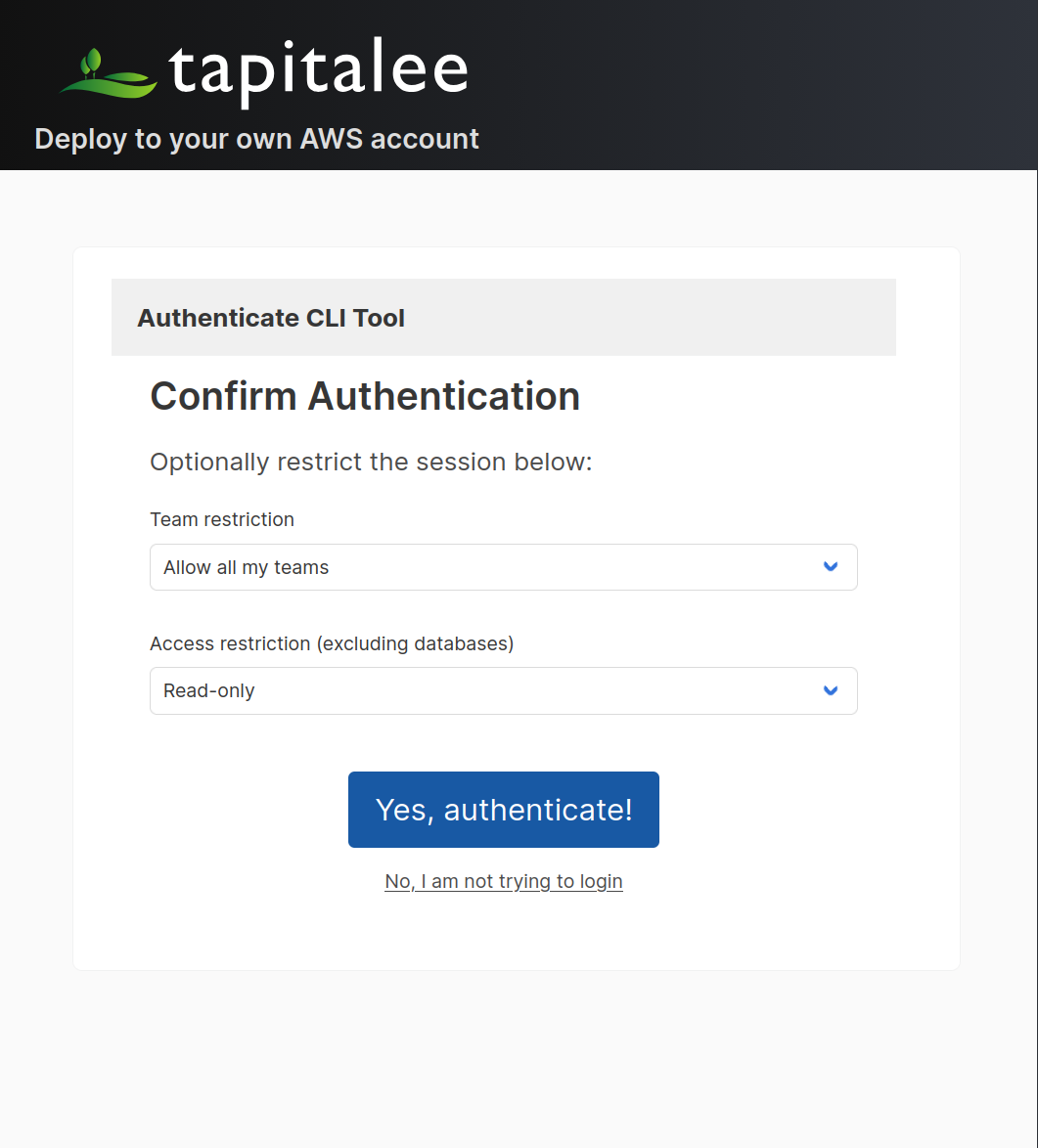
Alternatively, preconfigure an agent token in the local environment using the TAPIT_TOKEN environment variable:
export TAPIT_TOKEN=your-agent-token
When TAPIT_TOKEN is set, the CLI authenticates with that token instead of your interactive login, so the agent only gets the capabilities the token grants — for example, read-only access to a single app with no ability to read secrets. See Agent Safety and Access Control for how to create limited tokens.
Installing the skill
Download the skill file and place it where your agent looks for skills:
curl -fsSL https://docs.tapitalee.com/docs/skills/SKILL.md -o SKILL.md
Claude Code
Skills live in .claude/skills/<name>/SKILL.md (per project) or ~/.claude/skills/<name>/SKILL.md (global):
mkdir -p .claude/skills/tapitalee
curl -fsSL https://docs.tapitalee.com/docs/skills/SKILL.md -o .claude/skills/tapitalee/SKILL.md
To scope the agent’s access, set the token in your shell before starting Claude Code, or add it to your project settings:
TAPIT_TOKEN=your-agent-token claude
OpenAI Codex / ChatGPT
Codex reads project instructions from AGENTS.md. Either paste the skill contents into AGENTS.md, or reference a local copy:
mkdir -p docs/agents
curl -fsSL https://docs.tapitalee.com/docs/skills/SKILL.md -o docs/agents/tapitalee-skill.md
Then in AGENTS.md:
When working with Tapitalee deployments, read docs/agents/tapitalee-skill.md
for instructions on using the tapit CLI.
Set TAPIT_TOKEN in the environment Codex runs in (for cloud environments, add it as an environment secret in the Codex environment settings).
Cursor
Add the skill as a project rule in .cursor/rules/:
mkdir -p .cursor/rules
curl -fsSL https://docs.tapitalee.com/docs/skills/SKILL.md -o .cursor/rules/tapitalee.mdc
Set TAPIT_TOKEN in your shell profile or the environment Cursor’s agent terminal inherits.
Other agents
Any agent that can run shell commands can use the skill — provide the SKILL.md contents in the agent’s system prompt, instructions file, or knowledge base, and make sure:
- The
tapitCLI is installed and on thePATH(see Installing the CLI). TAPIT_TOKENis set in the agent’s environment with an appropriately limited token.
Recommendations
- Always set
TAPIT_TOKENwith a limited agent token rather than letting agents use your interactive login. - Scope tokens to a single app with the minimum capabilities the agent needs.
- Combine with the other measures in Agent Safety — read-only add-on sharing and immutable backups — when agents work near production data.